MRS ROS Build Pipeline & CI/CD
This guide provides a comprehensive overview of the MRS Continuous Integration and Continuous Deployment (CI/CD) ecosystem, explaining how individual package repositories, reusable GitHub workflows, central buildfarms, and Ubuntu Personal Package Archives (PPAs) interact to automatically compile, test, and distribute Debian packages for both ROS 1 (Noetic) and ROS 2 (Jazzy) across amd64 and arm64 architectures.
1. Ecosystem Architecture & Inter-relationships
The MRS software distribution relies on several loosely coupled components:
+-----------------------------------------------------------------------------------------+
|                                Individual Repositories                                  |
| (e.g., mrs_uav_managers, mrs_lib, mrs_robofly_core)                                     |
|  - Development Branches: ros2 / ros1 (legacy: master)                                   |
|  - Candidate Branches:   ros2_release_candidate / ros1_release_candidate                |
|  - Release Branches:     ros2_release / ros1_release                                    |
|  - Local Workflows:      .github/workflows/ros_package_build.yml, ros_build_test.yml    |
+-----------------------------------------------------------------------------------------+
                                      |
                                      v calls reusable workflows
+-----------------------------------------------------------------------------------------+
|                                ctu-mrs/ci_scripts                                       |
|  - Reusable GitHub Actions workflows (@ros2, @master)                                   |
|  - Bloom debian generation, architecture matrix builds (amd64, native/QEMU arm64)       |
|  - PPA deployment scripts (push_to_ppa.sh)                                              |
+-----------------------------------------------------------------------------------------+
                                      |
                                      v orchestrated & scheduled by
+-----------------------------------------------------------------------------------------+
|                    ctu-mrs/buildfarm (ROS 1) & ctu-mrs/buildfarm2 (ROS 2)               |
|  - Package registries: mrs.yaml, nonbloom.yaml, thirdparty.yaml                         |
|  - Dependency graph resolution & topological build order                                |
|  - Overnight matrix builders & automated test dispatchers                               |
+-----------------------------------------------------------------------------------------+
                                      |
                                      v builds inside primed container images
+-----------------------------------------------------------------------------------------+
|                     GitHub Container Registry (ghcr.io/ctu-mrs/...)                     |
|  - Builder images with pre-cached toolchains & dependencies                             |
+-----------------------------------------------------------------------------------------+
                                      |
                                      v publishes packages to
+-----------------------------------------------------------------------------------------+
|                                  Ubuntu PPAs                                            |
|  - ppa:ctu-mrs/ppa2-unstable  <-- Automatic on-push from ros2 / ros1                    |
|  - ppa:ctu-mrs/ppa2-testing   <-- Automatic on-push from *release_candidate             |
|  - ppa:ctu-mrs/ppa2-stable    <-- Promoted by ctumrsbot upon passing automated tests    |
+-----------------------------------------------------------------------------------------+
Individual Package Repositories
Every repository contains its own source code, package.xml, and CMakeLists.txt. Rather than re-implementing complex packaging scripts in every repository, each repo contains lightweight GitHub workflow files under .github/workflows/ that delegate build tasks to centralized workflows in ctu-mrs/ci_scripts.
ctu-mrs/ci_scripts
The ci_scripts repository centralizes all packaging and deployment scripts:
- Standard ROS Bloom packaging (
bloom-generate rosdebian) - Non-bloom packaging for custom CMake, Autotools, or Make-based libraries
- Multi-architecture builds (native
amd64and ARM64 via native runners or QEMU) - PPA artifact publishing, GPG signing, and changelog updates via
push_to_ppa.sh
ctu-mrs/buildfarm (ROS 1) & ctu-mrs/buildfarm2 (ROS 2)
The buildfarm repositories orchestrate complete automated builds of the entire MRS ecosystem. The pipeline is structured into three distinct sub-pipelines:
- NonBloom packages (
nonbloom.yaml): Packages not built with ROS Bloom; they rely on a generic Debian packaging mechanism for external C/C++ libraries and drivers. - Third-party ROS packages (
thirdparty.yaml): External ROS dependencies packaged for MRS. They do not change often and do not depend on custom MRS packages. - MRS packages (
mrs.yaml): The primary MRS UAV packages that form the core autonomous system. They depend on foundation libraries and third-party packages.
The ROS-driven pipelines automatically resolve the dependency graph into topological build orders so that upstream foundations (such as mrs_msgs and mrs_lib) compile and publish before downstream managers and controllers.
Primed Builder Container Images (GHCR)
To avoid spending hours re-installing hundreds of Debian build dependencies on every workflow run, the buildfarm relies on pre-built builder images on GitHub Container Registry (GHCR):
ghcr.io/ctu-mrs/buildfarm2:jazzy_builder_amd_<sha>ghcr.io/ctu-mrs/buildfarm2:jazzy_builder_arm_<sha>
2. The Three-Tier Distribution Model
MRS packages are distributed through three Launchpad PPAs corresponding to specific branch roles:
| Pipeline Tier | Target PPA | ROS 2 Standard Branch | ROS 1 Modern Branch | ROS 1 Legacy Branch | Purpose & Audience |
|---|---|---|---|---|---|
| Unstable | ppa2-unstable | ros2 | ros1 | master | Active development; continuous on-push builds of the latest commits |
| Testing | ppa2-testing | ros2_release_candidate | ros1_release_candidate | release_candidate | Pre-release staging; daily validation and automated system testing |
| Stable | ppa2-stable | ros2_release | ros1_release | release | Verified production releases; physical drones and end users |
Clarifying Branch Names (master vs ros1 vs ros2)
Historically in ROS 1, repositories used master, release_candidate, and release. However, having generic master or main branches causes substantial confusion—especially in newer repositories where a master or main branch might exist as a default repository branch with no ROS 1 / Noetic content whatsoever.
To eliminate ambiguity, the clean standard across the MRS organization is:
- ROS 2 Standard:
ros2,ros2_release_candidate, andros2_release - ROS 1 Standard (Clean):
ros1,ros1_release_candidate, andros1_release(migrating away from genericmaster,release_candidate, andrelease) - Wildcard Ruleset Synergy: Using wildcard patterns like
*releaseand*release_candidatein GitHub rulesets cleanly protects both modern prefixed branches (ros2_release,ros1_release) and legacy branches (release) simultaneously without duplicate rules.
3. Why Are There Two Release Branches? (*release_candidate vs *release)
A central question often asked by developers is why both a candidate branch and a release branch are needed.
[Developer pushes / merges tested feature]
                    |
                    v
          *release_candidate
                    |
                    v (Builds packages)
             ppa-testing PPA
                    |
                    v (Runs overnight / on dispatch)
             Automated Tests (rostests)
                    |
             +------+------+
             |             |
           Passed        Failed
             |             |
             v             v
      [ctumrsbot merges]  [Release blocked!]
      *release_candidate   Fix issue in dev branch
        into *release      and re-promote
             |
             v (Builds packages)
             ppa-stable PPA
- Human Decision vs Automated Verification:
- Developers choose when a milestone or feature set is ready by pushing to
*release_candidate. - The package is built into the testing PPA.
- Developers choose when a milestone or feature set is ready by pushing to
- The Test Gatekeeper:
- Automated system integration tests (
rostest) run against the testing PPA via the release pipeline workflow. - If (and only if) all tests pass, the automated bot (
ctumrsbot) automatically fast-forwards/merges*release_candidateinto*release. - The stable build triggers exclusively from
*release, publishing verified packages to the stable PPA.
- Automated system integration tests (
- Protecting Production:
- Every commit that lands on
*releasegenerates a stable release. If humans pushed directly to*releaseand introduced a compile failure or subtle regression, it would immediately break the production PPA for all users. The candidate branch acts as an essential buffer.
- Every commit that lands on
Never push directly to *release manually.
Only the automated bot account (ctumrsbot) should write to *release branches upon automated test validation.
4. Step-by-Step: Adding a New Package to the Pipeline
Follow these 5 steps to onboard any repository into the MRS build pipeline.
Step 1: Create the Required Branches
Create the candidate and release branches from your development branch:
# For a ROS 2 package:
git checkout ros2
git branch ros2_release_candidate
git branch ros2_release
git push -u origin ros2_release_candidate
git push -u origin ros2_release
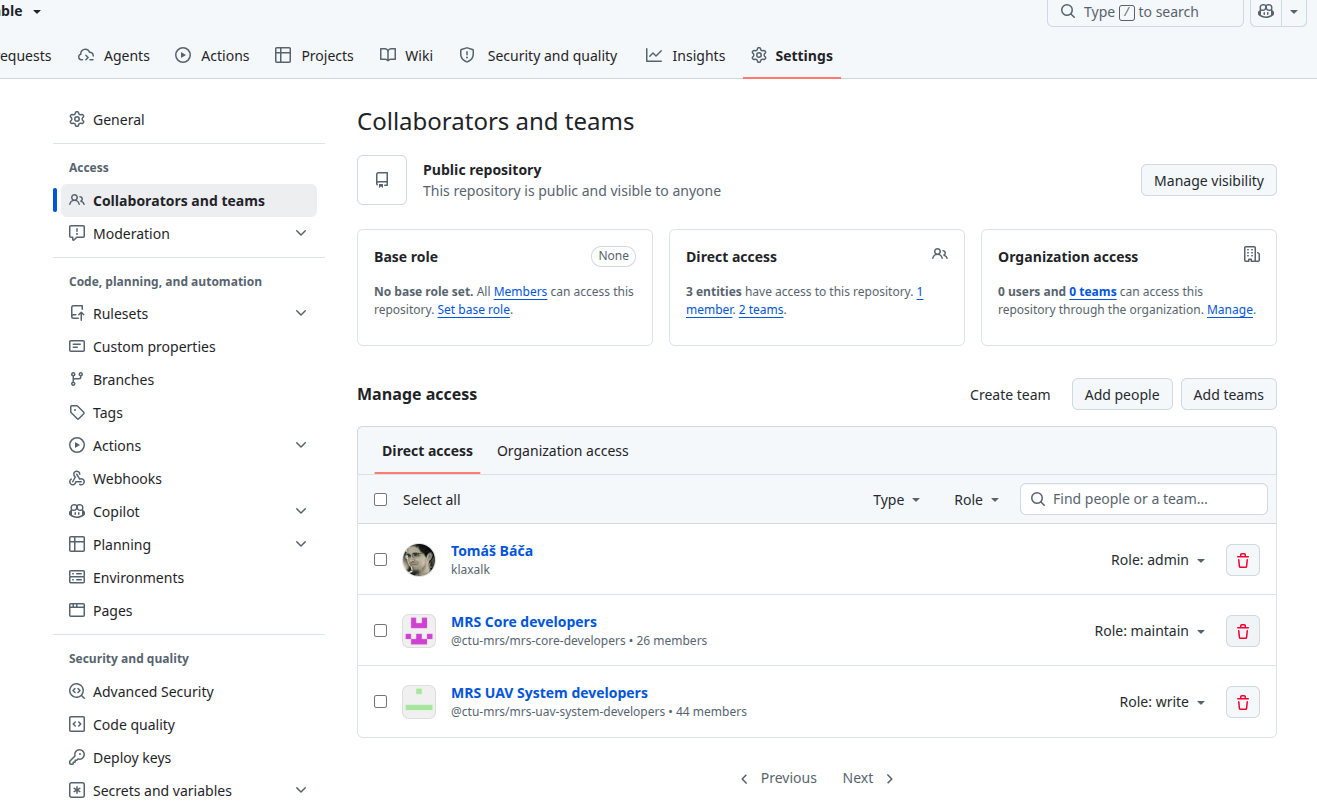
Step 2: Add Collaborator Teams or Maintainers (Suggested Access Pattern)
Before configuring GitHub Rulesets, collaborators or teams must have access to the repository. GitHub rulesets cannot exempt actors from rules or add them to bypass lists unless they already have direct repository access.
Team membership, responsibilities, and repository ownership naturally vary across packages. The team roles below reflect a suggested convention and convenient starting point for repositories in the ctu-mrs organization, rather than a rigid mandate. Repository owners are encouraged to adapt these suggestions—for instance, by substituting individual maintainers or custom teams depending on who actively maintains the package.
- Open your repository on GitHub.
- Go to Settings → Collaborators and teams.
- Under Manage access, consider granting access according to your project's needs:
- Suggested Maintainer Access (
Maintainrole):- Example group:
MRS Core developers(@ctu-mrs/mrs-core-developers) or designated individual package maintainers. - Purpose: Responsible for repository settings, triage, and staging release candidates (
*release_candidate).
- Example group:
- Suggested Contributor Access (
Writerole):- Example group:
MRS UAV System developers(@ctu-mrs/mrs-uav-system-developers) or active package contributors. - Purpose: Day-to-day development on
ros2orros1, opening pull requests, and pushing feature branches.
- Example group:
- Suggested Maintainer Access (
Step 3: Configure Branch Protection Rulesets
Modern GitHub uses Rulesets (located in Settings → Rules → Rulesets). Unlike legacy branch protection rules which required duplicating rules per branch, rulesets support wildcard pattern matching across multiple targets.
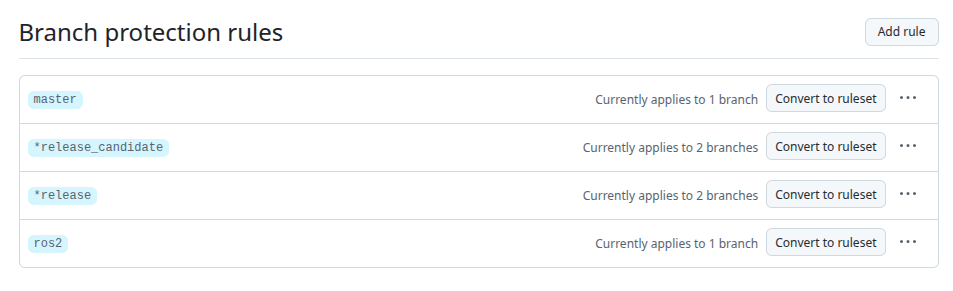
We recommend setting up two rulesets:
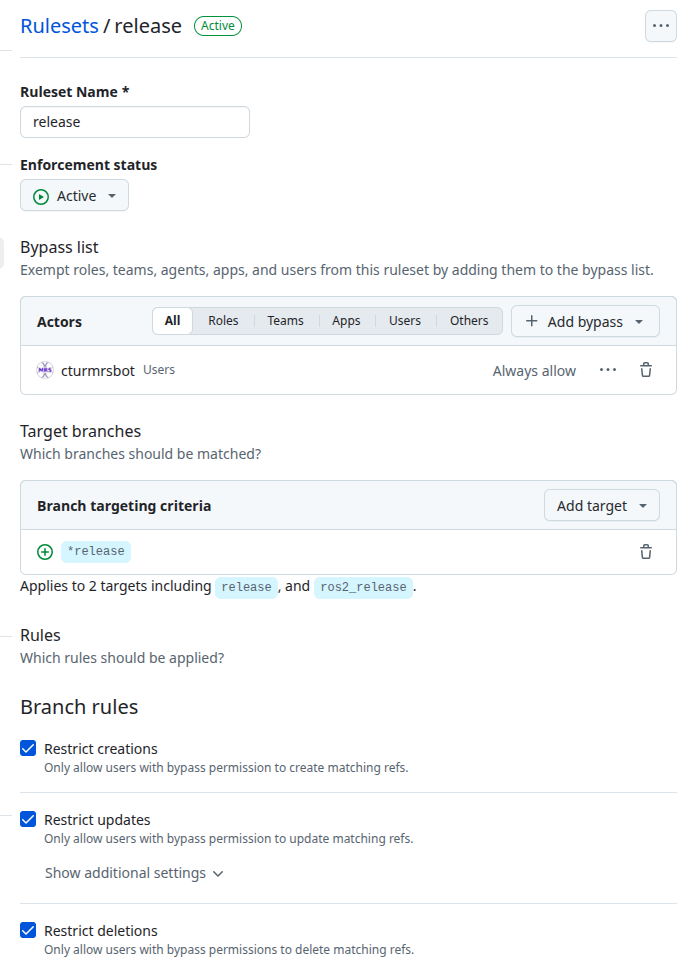
Ruleset 1: release (Strict Bot Protection)
Protects all production release branches so only ctumrsbot can update them:
- Ruleset Name:
release - Enforcement status:
Active - Bypass list:
- Add
ctumrsbot(User) → Set to Always allow.
- Add
- Target branches:
- Add target → Include by pattern →
*release - (Automatically matches
ros2_release,ros1_release, and legacyrelease).
- Add target → Include by pattern →
- Branch rules:
- ✓ Restrict creations
- ✓ Restrict updates
- ✓ Restrict deletions
- ✓ Block force pushes (checked by default)
Ruleset 2: release_candidate (Restricted to Maintainers)
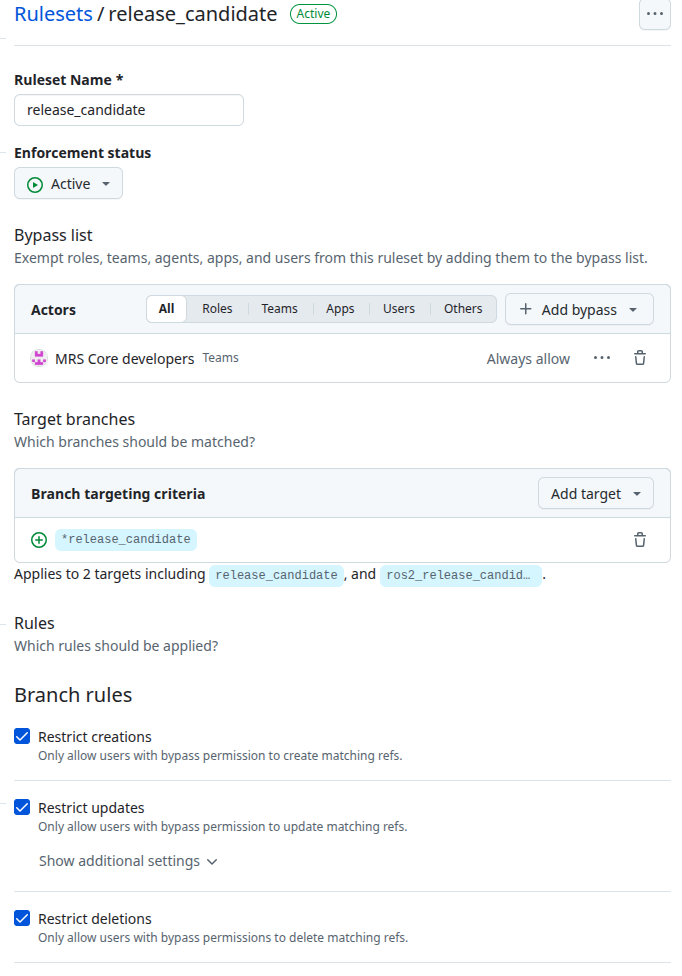
Restricts candidate promotions so only authorized package maintainers can stage releases:
- Ruleset Name:
release_candidate - Enforcement status:
Active - Bypass list:
- Add your designated maintainers (e.g. the
MRS Core developersteam, or individual package leads) → Set to Always allow.
- Add your designated maintainers (e.g. the
- Target branches:
- Add target → Include by pattern →
*release_candidate - (Automatically matches
ros2_release_candidate,ros1_release_candidate, and legacyrelease_candidate).
- Add target → Include by pattern →
- Branch rules:
- ✓ Restrict creations
- ✓ Restrict updates
- ✓ Restrict deletions
- ✓ Block force pushes
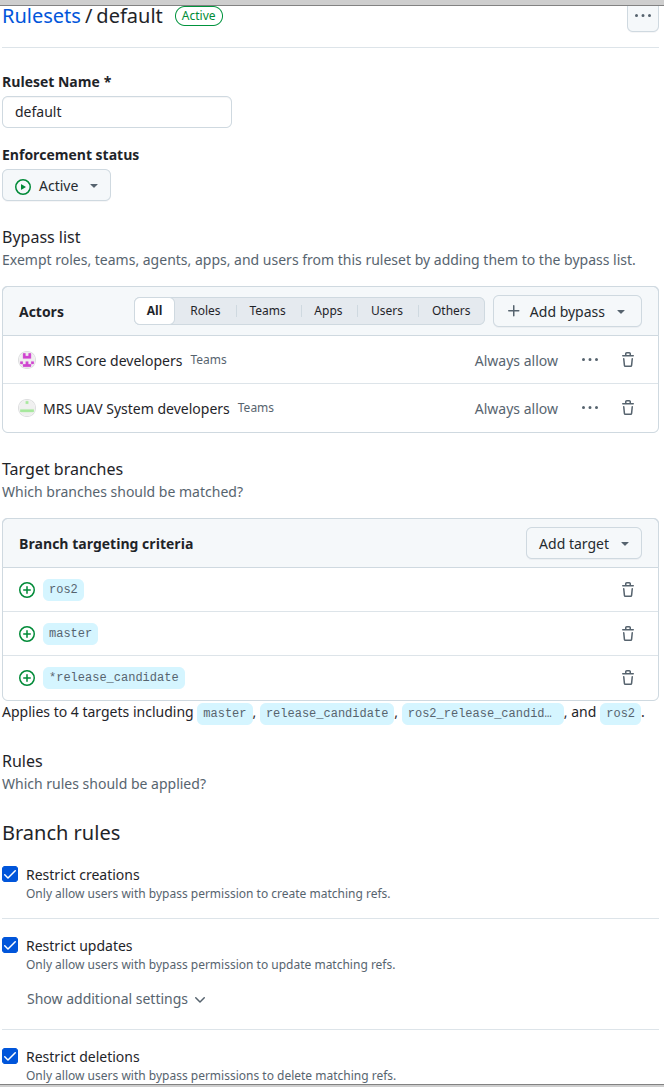
You can also protect development branches and candidate branches together in a single default ruleset:
- Ruleset 1 (
release): Target*release, bypass forctumrsbotonly. - Ruleset 2 (
default): Targetros2,ros1, and*release_candidate, granting bypass to your designated maintainers and contributors (e.g.,MRS Core developersandMRS UAV System developers, or your repository's maintainer list).
Step 4: Add GitHub Actions Workflows to the Repository
Create two workflow files in .github/workflows/ of the repository:
1. .github/workflows/ros_package_build.yml
Builds and uploads Debian packages on push:
name: ros_package_build

on:
  push:
    branches: [ ros2 ]
    paths-ignore:
      - '**/README.md'

  workflow_dispatch:

concurrency:
  group: ${{ github.workflow }}-${{ github.ref }}
  cancel-in-progress: true

jobs:
  build:
    uses: ctu-mrs/ci_scripts/.github/workflows/ros_package_build.yml@ros2
    secrets:
      PUSH_TOKEN: ${{ secrets.PUSH_TOKEN }}
2. .github/workflows/ros_build_test.yml
Tests pull requests and development branches without deploying to PPAs:
name: ros_build_test

on:
  push:
    branches: [ ros2_devel ]
    paths-ignore:
      - '**/README.md'

  pull_request:
    branches: [ ros2 ]

  workflow_dispatch:

concurrency:
  group: ${{ github.workflow }}-${{ github.ref }}
  cancel-in-progress: true

jobs:
  build:
    uses: ctu-mrs/ci_scripts/.github/workflows/ros_build_test.yml@ros2
Step 5: Register the Package in the Buildfarm
- ROS 2: Edit
buildfarm2/mrs.yaml
Example Entry (mrs.yaml):
mrs_robofly_core:
  architecture: [amd64, arm64]
  source: https://github.com/ctu-mrs/mrs_robofly_core
  gitman: false
  git_refs:
    unstable: ros2
    testing: ros2_release_candidate
    stable: ros2_release
  generate_apt_package: true
  generate_docker_image: false
  nix: false
  ros_test:
    enabled: false
    full_test_coverage: false
Field Explanations:
architecture: Architecture targets:[amd64, arm64].source: The HTTPS git clone URL.gitman: Settrueif compilation depends on a.gitman.yamlconfiguration.git_refs: Branch names forunstable,testing, andstable.generate_apt_package: Settrueto build binary and source Debian packages for the PPAs.generate_docker_image: Settrueif the package generates a standalone Docker container image.nix: Whether to generate Nix derivations.ros_test:enabled:trueto run automated unit/integration tests during buildfarm runs.full_test_coverage: Enables test coverage metrics.
5. Container Registry (GHCR) Access
The buildfarm executes builds inside primed Docker containers hosted on the GitHub Container Registry.
The "Error response from daemon: denied" Issue
If you or a developer attempt to pull a builder image locally:
$ docker pull ghcr.io/ctu-mrs/buildfarm2:jazzy_builder_amd_36126839068
Error response from daemon: denied
Why It Happens & How to Fix It
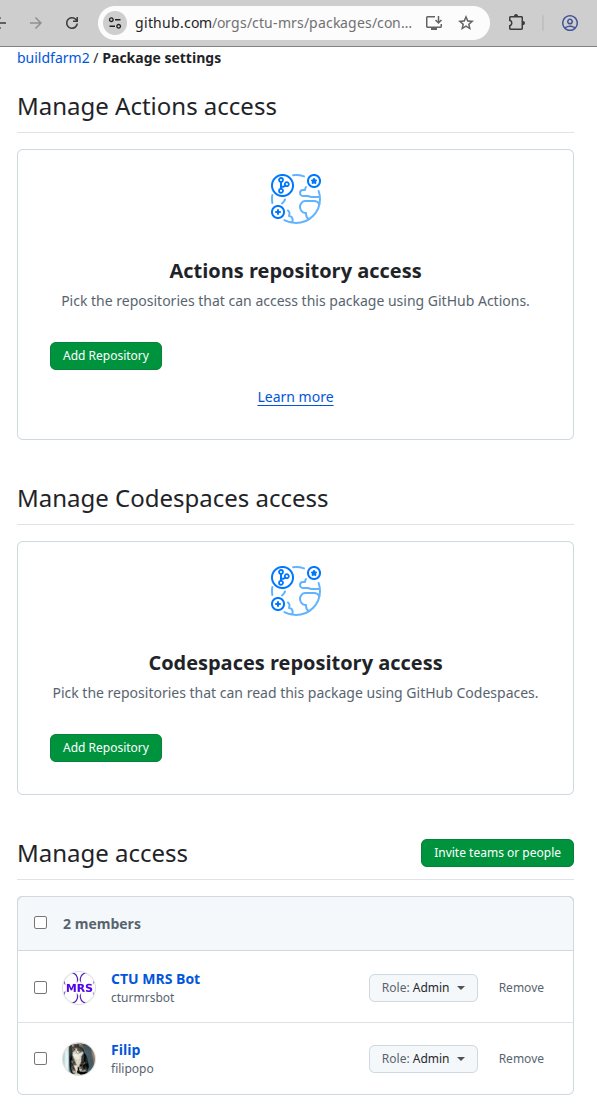
GitHub Packages images belong to the organization and are private by default:
- Actions Access: In the package settings (
github.com/orgs/ctu-mrs/packages/container/<package_name>/settings), the organization admin must ensure repositories running CI workflows are added under Actions repository access. - Member Access: Under Manage access, team members or developer groups must be granted Read access.
- Local Docker Authentication: If pulling to a local machine, log in via a GitHub Personal Access Token (PAT) with
read:packagesscope:echo $GITHUB_PAT | docker login ghcr.io -u YOUR_GITHUB_USERNAME --password-stdin
6. Quick Reference Summary
| Task | Where to Configure | Who Has Access (Suggested Pattern) |
|---|---|---|
| Daily Development | Push to ros2 | Package Contributors (suggested: Write access) |
| Propose Release | Push/Merge to *release_candidate | Package Maintainers (suggested: Maintain access) |
| Stable Deployment | Fast-forward to *release | ctumrsbot only (automated upon passing tests) |
| Collaborator Teams | Package Repo → Settings → Collaborators | Repository Admins |
| Branch Rulesets | Package Repo → Settings → Rules → Rulesets | Repository Admins |
| Register Package | buildfarm2/mrs.yaml | Buildfarm Maintainers |
| Builder Image Access | GitHub Org → Packages → Package Settings | Organization Admins |
Collaborator teams and access levels listed above are recommended guidelines. Repository owners may assign permissions to individual maintainers or alternative teams to best match who is actively developing and maintaining the codebase.